
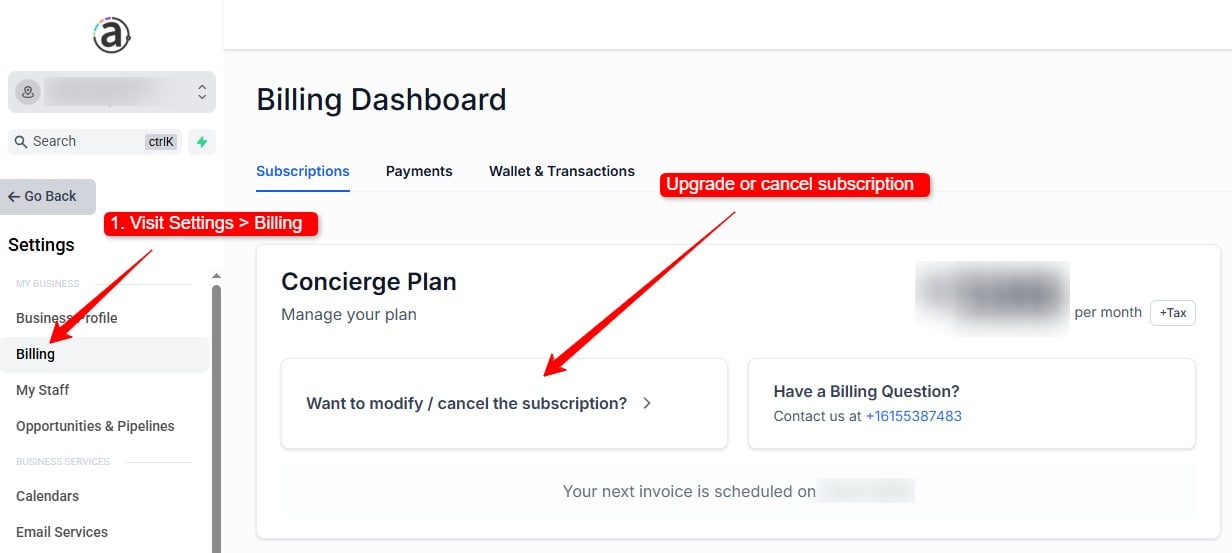
If you are an existing customer of our app, you may log in to app.allmywebneeds.com to manage your subscription plan with the available options.
Note: These instructions are not applicable for any service/billing that is not managed within our app. If you are a customer of other services such as done-for-you marketing, WordPress management, or any other service that is not billed within our app, please submit a support ticket.
- To upgrade, modify, or cancel your app plan, log in and navigate to Settings > Billing.
- Then click the button labeled “Want to modify / cancel the subscription?”
You can cancel your subscription at any time. Subscription charges are non-refundable, so canceling does not refund payments that have already been processed, but it does stop future subscription billing.
Due to the nature of our done-for-you services, setup, website work, implementation, strategy, and hands-on support from our team, users are not able to downgrade after we have provided any done-for-you services. This helps us keep pricing fair and sustainable for clients who receive upfront implementation work as part of their subscription.
